Real Size Online Ruler (inch, cm, mm)
Features of our online ruler
This is an online scale ruler that can be adjusted to an actual size,
the upper half is metric ruler (millimetre and centimetre), lower half is inches ruler,
before you use this ruler, please set the pixels per inch to your own device.
Adjusting this virtual ruler to actual size
There are some ways to know the pixels per inch(PPI) to your devie.
- Tell me your screen diagonal size (in inches), and I can calculate and set it for you directly
Your screen resolution is pixels,
based on a PPI setting,
your screen size(diagonal) should be 27 inches,
width inches,
height inches.
- The browser zoom level must be set to 100% for the virtual ruler to display correctly.
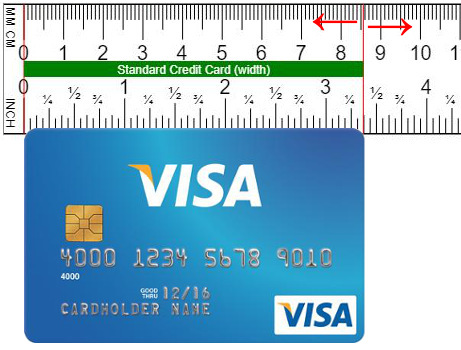
- The simplest and most convenient way is to take a standard credit card (3.375 inches wide), compare it with our ruler, and calibrate it.
- Banknotes also have a standard length. You can find the "length of the banknote you have" online and use it as a reference to adjust your PPI setting.
- The most accurate way,
after i measure the size of virtual ruler by a actual ruler,
i found the markings are not very accurate at 30cm,
so i adjust the default pixels per inch(PPI) to 100.7,
then I was quite certain that my screen ruler was very accurate.
-
Each device has its own PPI:
- my Desktop monitor (AOC CQ27G2/96), DPR 1.5: 72.5 PPI
- my Mobile phone (OPPO Reno 12): 116.7 PPI
- Apple iPhone X: 152.7 PPI
- Apple iPhone 11: 163 PPI
- Apple iPhone 12/13/14/15/16/17: 153.3 PPI
- Samsung Galaxy S22/S23: 141.8 PPI
- Samsung Galaxy S24: 138.5 PPI
- PPI here refers to the number of pixels used when drawing the ruler scales;
it refers to CSS pixels, not device pixels,
if you Google "iphone 17 ppi," it'll tell you 460 ppi,
however the device pixel ratio(DPR) will affect the actual size,
so you need to divide this number by it, for example, 460 ÷ 3 = 153.3.
Using a PPI of 153.3 will give you a close approximation to the correct size.
This is a bit complicated, so I recommend using a credit card to compare for accuracy,
then you can use it with confidence.
Your device pixel ratio(DPR) :
Compare online ruler with credit card
The simplest way to calibrate the scale is to prepare a credit card,
select the option to use the credit card for comparison, enter the calibration mode,
and begin adjustment.
Dragging ruler adjuster left or right to fit the size of your reference object,
remember to save the setting for the next time you use it,
after save the setting, refresh your brower to check the result.
On the most popular browsers you can press the F5 key or click on the refresh button.
Online Virtual Rulers
Length Converters
Try this ruler on your smartphone
Scan QR Code To Open Browser